Surface Pro 12-inch (Snapdragon X2 Plus) Review: Is This the Ultimate 2-in-1 Laptop for Remote Work?
The transition of Windows laptops to ARM-based architecture is undeniably the most significant computing story of 2026. For years, mobile professionals, remote workers, and college students had to choose between the incredible all-day battery endurance of an Apple MacBook and the versatile, touchscreen 2-in-1 form factor of a Windows machine. That brutal compromise officially ends this year.
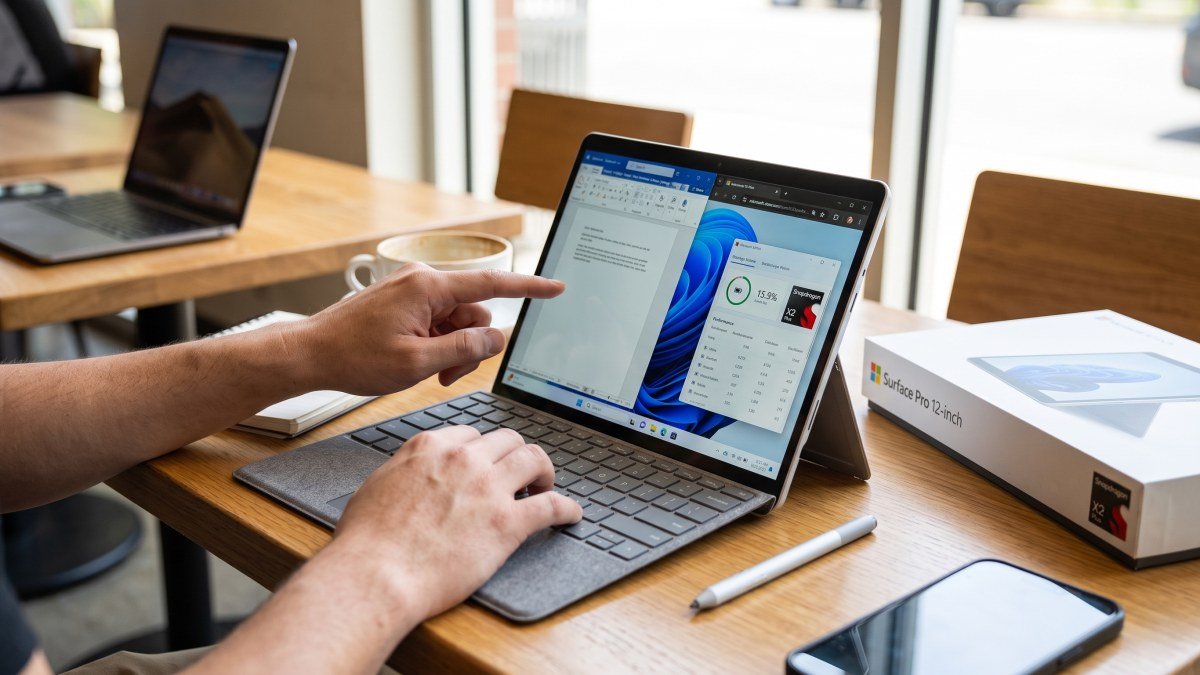
Microsoft has refreshed its entry-level hybrid with the brand-new 12-inch Surface Pro, now powered by Qualcomm's cutting-edge Snapdragon X2 Plus processor. Launching globally in October with a starting price of $1,149, this machine promises to deliver an uncompromising blend of marathon endurance and rapid productivity. We have spent time evaluating this device to see if it truly deserves a spot in your daily remote work arsenal.
In this comprehensive review, we will evaluate its raw performance, dive deep into the Surface Pro 12-inch Snapdragon X2 Plus battery life, and determine if it can finally dethrone traditional clamshell laptops as the ultimate portable workstation.
The Snapdragon X2 Plus Leap: Raw Performance
Before examining the exterior, we have to talk about what is beating under the hood. The original Surface Pro 12-inch launched with the first-generation Snapdragon X Plus, which was a solid entry-level chip but lacked the graphical punch for heavier creative workflows. The new Snapdragon X2 Plus is a completely different beast.
According to Microsoft's metrics, the jump to the X2 Plus architecture brings some staggering generational improvements. The new 12-inch Pro delivers up to 17% faster processing in standard Office workloads and an incredible 60% boost in graphical performance compared to its predecessor. Whether you are juggling massive Excel spreadsheets with thousands of macros, rendering video timelines, or participating in heavy video conferences, the thermal management here is flawless. The device remains remarkably cool to the touch and practically silent, a testament to the hyper-efficiency of modern ARM architecture.
Furthermore, the chip features a powerful 80 TOPS (Trillions of Operations Per Second) NPU (Neural Processing Unit), making it up to 95% faster at on-device AI inferencing. This hardware acceleration powers everything from real-time background blurring on Teams calls to generating offline text summaries without ever needing to send your sensitive data to an external cloud server.
Evaluating the Surface Pro 12-inch Snapdragon X2 Plus Battery Life
The single most important metric for any remote worker or traveling student is battery endurance. When working from a crowded coffee shop, an airport lounge, or a client's office, hunting for a wall outlet completely ruins your productivity flow. This is exactly where Qualcomm's silicon shines the brightest.
Microsoft claims the new silicon yields up to an 18% improvement in overall battery efficiency over the first generation. The Surface Pro 12-inch Snapdragon X2 Plus battery life is nothing short of revolutionary for a high-resolution Windows tablet. Because the ARM chip draws a fraction of the wattage required by older Intel processors, this slim tablet can easily power through a full 8-to-10 hour workday on a single charge.
For passive media consumption and video playback, the numbers stretch even higher. If you download movies for a long-haul international flight, the Surface Pro 12-inch will effortlessly survive the journey with power to spare. When compared directly to the battery-king MacBook Air, the Surface Pro firmly holds its own, offering a full day of demanding work without a hint of battery anxiety. It finally gives Windows users the untethered freedom they have envied for years.
Display Upgrades and 2-in-1 Flexibility
The defining characteristic of the Surface Pro lineup is its unmatched physical flexibility, and the 12-inch chassis remains the absolute pinnacle of this design philosophy.
Microsoft has dramatically upgraded the 3:2 PixelSense touchscreen this year. The display is now 25% brighter, maxing out at a brilliant 500 nits. This means you can comfortably work on outdoor patios or in sun-drenched home offices without squinting through heavy screen glare. The device also introduces a sleek new Black color option, utilizing an enclosure made from 86% recycled materials, giving it a premium, stealthy aesthetic.
The signature built-in kickstand still reclines up to a near-flat 165 degrees, which is the perfect angle for digital artists or casual movie viewing. However, to unlock the true potential of this machine, you absolutely must purchase the optional Surface Pro Keyboard and the Surface Slim Pen. While it remains slightly frustrating that these essential accessories are sold separately, snapping the magnetic keyboard onto the base instantly transforms the device from a powerful tablet into a zero-compromise laptop replacement.
Software Compatibility and the Copilot+ Era
One of the historical drawbacks of buying an ARM-based Windows device was application compatibility. In the past, running standard programs on an ARM chip required slow, buggy software emulation. Fortunately, by late 2026, the Windows on ARM ecosystem is incredibly robust and thriving. Almost all major creative and productivity suites—including Adobe Creative Cloud, Google Chrome, and Slack—run natively on the Snapdragon X2 Plus, ensuring buttery-smooth performance.
Microsoft is also heavily leveraging this new hardware to push its software innovations. Launching exclusively alongside this device is "Ink Canvas," a brilliant new application built directly for the Slim Pen. Ink Canvas is an AI-powered, pen-first workspace that allows you to sketch ideas, generate images, and summarize handwritten notes spatially. It is the perfect tool for students diagramming complex biology notes or project managers mapping out structural wireframes.
By the Numbers: Gen 1 vs Gen 2
To truly understand how much the entry-level 12-inch Pro has evolved, here is a quick breakdown comparing the brand-new X2 Plus model against last year's standard X Plus release:
| Specification / Metric | Surface Pro 12-inch (Snapdragon X Plus) | Surface Pro 12-inch (Snapdragon X2 Plus) |
|---|---|---|
| Starting Price | $899 (Launch) | $1,149 |
| Graphics Performance | Baseline Reference | Up to 60% Faster |
| Battery Efficiency | Strong | 18% More Efficient |
| Peak Display Brightness | Standard | 500 nits (25% Brighter) |
| AI Processing (NPU) | 45 TOPS | 80 TOPS (95% Faster) |
The Verdict: Is It the Ultimate Remote Work Laptop?
The Surface Pro has always been a marvel of hardware engineering, but it was historically held back by the thermal constraints and poor battery life of older processors. The complete transition to Qualcomm's Snapdragon silicon has fully unlocked the device's potential.
At $1,149 (plus the cost of a keyboard and pen), it is certainly a premium investment. But for that price, you are getting a beautifully uncompromising experience. The incredible Surface Pro 12-inch Snapdragon X2 Plus battery life ensures you can leave your charging brick at home, while the 2-in-1 design means you are carrying both a world-class tablet and a high-performance laptop in a single, ultra-portable chassis.
If your daily workflow revolves around remote productivity, web-based apps, and creative flexibility, this is unquestionably one of the most exciting Windows devices on the market. It proves that the era of ARM computing isn't just arriving—it is already here, and it is spectacular.